SMS opt-in
Last updated November 16, 2026
InviteLift is operated by InviteLift LLC. Text updates are off right now. The program remains off until a texting route is approved and it is separately turned on. No sign-in is needed to read this explanation.
InviteLift does not send invitation texts. Send invitations by email, or text the private link from your own phone. A host cannot enroll a guest in this program.
Program: InviteLift guest-requested event updates. After YES, up to 2 RSVP reminders, event changes and a cancellation notice; at most 7 event-update texts per guest per event. Confirmation prompts and requested replies are separate. No invitation texts, host alerts, marketing or promotional texts. Message and data rates may apply. Participation is optional, not a condition of RSVP or purchase. Reply STOP to opt out, HELP for help. Support: help@invitelift.com.
1. The guest chooses
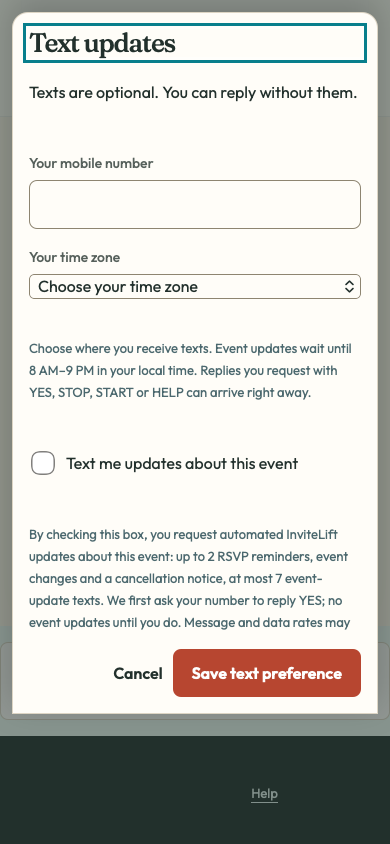
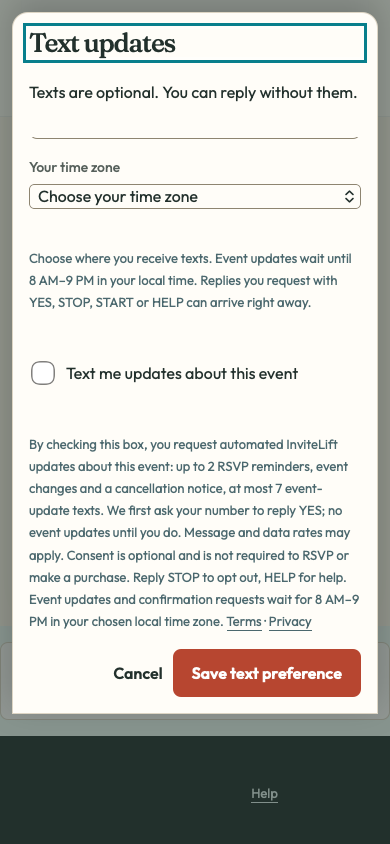
When the program is available, the guest enters their own mobile number on their private invitation, chooses their local time zone, and checks a box that starts unchecked: “Text me updates about this event.” A phone number and this choice are never required to reply. A host cannot supply the guest’s consent or enroll a guest-list number.
The guest disclosure is followed by Terms and Privacy links:
By checking this box, you request automated InviteLift updates about this event: up to 2 RSVP reminders, event changes and a cancellation notice, at most 7 event-update texts. We first ask your number to reply YES; no event updates until you do. Message and data rates may apply. Consent is optional and is not required to RSVP or make a purchase. Reply STOP to opt out, HELP for help. Event updates and confirmation requests wait for 8 AM–9 PM in your chosen local time zone.
Text message terms · Privacy Policy
2. That number confirms with YES
One confirmation asks the number to reply YES. It waits for 8 AM–9 PM in the guest’s chosen local time; a missing time zone means no send. Until YES arrives, no event updates are sent. A YES applies only to that number and that event. The confirmation expires after 72 hours; a new request is guest-initiated and limited, never automatic enrollment.
3. Event updates after YES
Up to 2 RSVP reminders plus event changes and a cancellation notice, within the 7-event-update limit. Event updates send between 8 AM and 9 PM in the recipient’s local time. Requested YES, STOP, START and HELP replies may arrive right away.
4. Stop any time
STOP blocks all InviteLift program texts from every host and allows one confirmation. HELP explains support. START cannot enroll a new event or bypass guest self opt-in and YES. Stopping texts does not change the RSVP or private invitation access. Carriers are not liable for delayed or undelivered messages.
Guest controls, shown with sample details
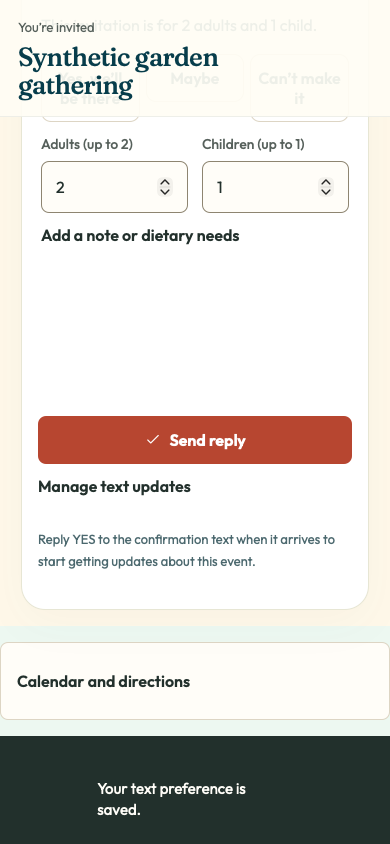
These are local test captures of the guest controls. Text updates are off; these pictures do not show an active phone number or a real text delivery.
Program examples
These examples use a synthetic event and the public sample invitation. They are not messages to a real guest.
- Number confirmationInviteLift: Reply YES for RSVP reminders, event changes and cancellation for Synthetic Birthday. No updates until YES. Up to 7 event updates. Msg & data rates may apply. STOP to opt out, HELP for help.
- RSVP reminder after YESInviteLift reminder for Synthetic Birthday: please RSVP by June 5. https://invitelift.com/sample Reply STOP to opt out, HELP for help.
- Event change after YESInviteLift update for Synthetic Birthday: The event is now on June 12 at 4 PM. https://invitelift.com/sample Reply STOP to opt out, HELP for help.
- Cancellation after YESInviteLift: Synthetic Birthday has been canceled. https://invitelift.com/sample Reply STOP to opt out, HELP for help.
Keyword reply examples
- YES to this event’s confirmationInviteLift: You confirmed event updates for Synthetic Birthday. Up to 7 event updates. Msg & data rates may apply. Reply STOP to opt out, HELP for help.
- STOPInviteLift: You have opted out of all InviteLift texts. No more program texts will be sent. Help: help@invitelift.com.
- HELPInviteLift event updates. Help: help@invitelift.com. Msg & data rates may apply. Reply STOP to opt out.
- STARTInviteLift: Your number is unblocked. To request updates for an event, open its invitation, choose texts and confirm with YES. Help: help@invitelift.com.
Phone numbers and text choices
Read the Privacy Policy for phone-number storage and delivery processing. Read the SMS terms for the program limits and your choices.
Help
Reply HELP to any InviteLift text, or email help@invitelift.com. InviteLift LLC · PO Box 8648, Houston, TX 77249.